In short
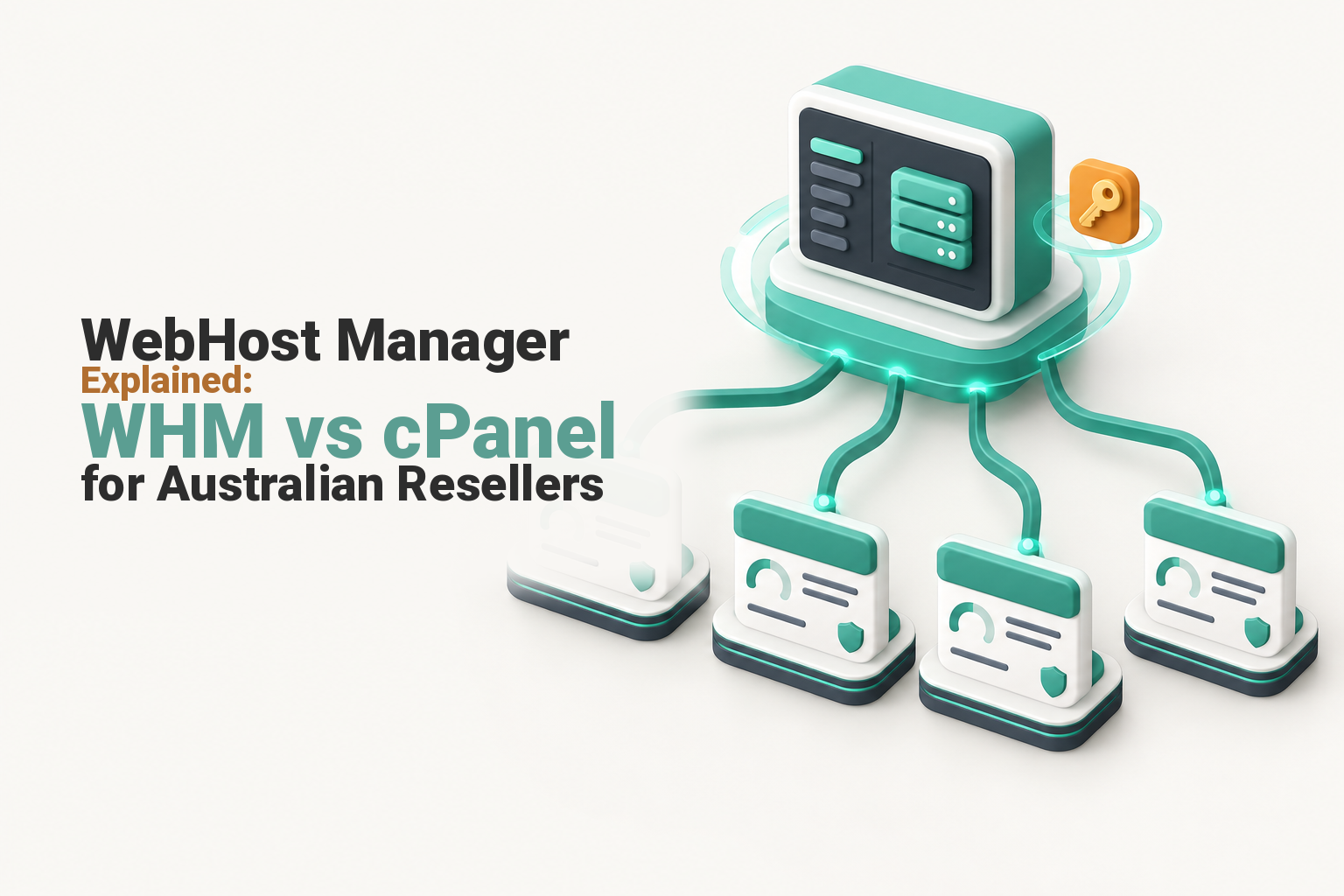
WebHost Manager (WHM) is the administration layer used to create and control multiple cPanel hosting accounts. An ordinary cPanel account manages one hosting account, while WHM manages accounts, packages, quotas and reseller permissions. Choose WHM when clients or websites need separate logins, limits and administrative boundaries, not merely several domains.
Key takeaways
- cPanel manages work inside one hosting account, while WHM manages multiple separate cPanel accounts.
- A multi-domain cPanel plan may be enough when every website belongs to the same organisation and can share one administrative boundary.
- Reseller WHM is restricted by permissions set by the hosting provider and is not the same as root access to a server.
- Hosting packages should standardise useful limits and features rather than create a different configuration for every client.
- Before ordering reseller hosting, confirm who handles server security, backups, restores and support for the reseller's clients.
Table of contents
- What is WebHost Manager used for?
- What is the practical difference between cPanel and WHM?
- Do I need WHM if I manage several websites?
- What can a reseller actually do in WHM?
- What cannot a reseller do without root access?
- How should accounts, packages and resources be structured?
- Who is responsible for security, backups and client support?
- How do WHM login, downloads and licensing work?
- When is reseller hosting the right next step?
- How should an Australian agency choose a WHM hosting plan?
- What else do people ask about WebHost Manager?
The confusing part is that cPanel and WHM are usually sold together, but they serve different users. A site owner may spend years inside cPanel without needing WHM, while an agency can outgrow an ordinary account as soon as separate client ownership, access and resource limits become important.

Performance you can feel, backed by clients who depend on it. Read how our support and uptime create long‑term customer success.Power Your Business with Better Hosting
What is WebHost Manager used for?
WebHost Manager is used to administer cPanel accounts and, where permission allows, parts of the server supporting them. A reseller normally receives a restricted WHM interface, while a system administrator may receive root-level WHM access.
The official WHM tool index includes account creation, DNS, mail, process and server tools. The tools visible to a particular user depend on the account's privileges.
Think of the structure as three layers:
- The server provides computing resources, storage, networking and the operating environment.
- WHM creates and controls cPanel accounts, packages and administrative permissions.
- cPanel lets the owner of one account manage websites, domains, files, email and databases.
WHM is not a website builder or a replacement for hosting infrastructure. It is the control layer attached to a cPanel & WHM server. Readers who need a simpler introduction can start with what cPanel means before comparing the two interfaces.
WHM is the control layer for multiple cPanel accounts, not the place where a client edits one website.
What is the practical difference between cPanel and WHM?
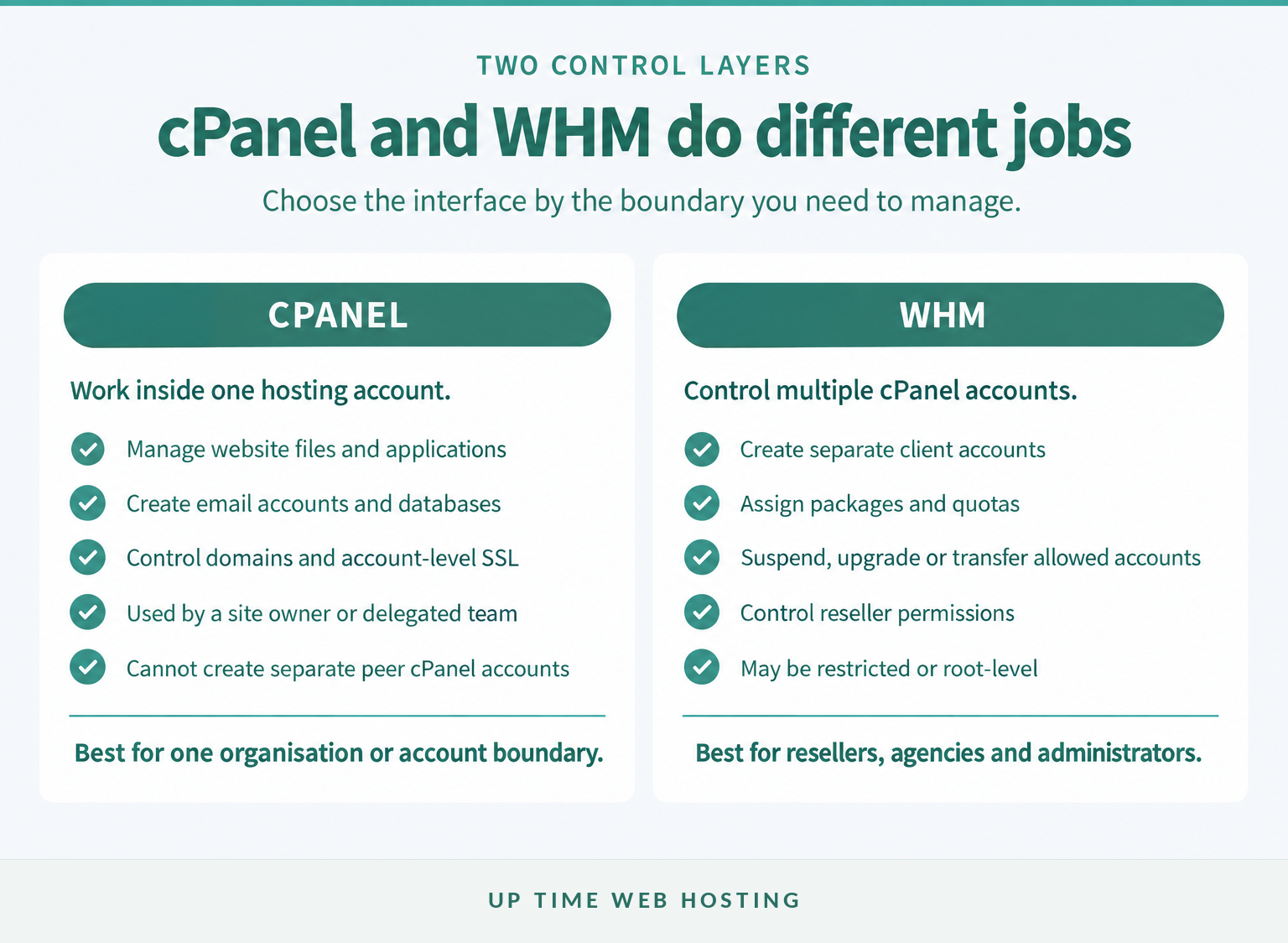
cPanel handles daily work inside one hosting account, while WHM controls how multiple cPanel accounts are created and governed. A person managing one business website will usually need cPanel, while a reseller or agency managing separate clients may need WHM.
| Question | cPanel | WHM |
|---|---|---|
| What does it manage? | One hosting account | Multiple cPanel accounts |
| Who normally uses it? | Site owners, staff and developers | Resellers, agencies and server administrators |
| What are common tasks? | Files, email, databases, domains and applications | Accounts, packages, quotas and permissions |
| Can it create separate cPanel accounts? | No | Yes, if the privilege is enabled |
| Does it provide server-wide control? | No | Only with the required WHM privileges |
| Can it host several domains? | Yes, if the plan permits | It creates separate accounts that may each host allowed domains |
Several domains inside one cPanel account still share an account-level administrative boundary. They may share credentials, resource limits, backup handling and the consequences of an account-level problem. How cPanel hosting works explains the user-facing layer in more detail.
WHM adds separation. An agency can give Client A a cPanel login without exposing Client B's files, mailboxes or databases. The reseller can also suspend, upgrade or transfer one account without treating every hosted website as a single unit, provided the necessary permissions are enabled.
Choose cPanel for work inside one account and WHM for controlling separate accounts.
Host your website with our 5-star rated, cPanel website hosting plans.
Super fast servers, with security included and hosted in your choice of Australian Data Center.
View cPanel Plans
Do I need WHM if I manage several websites?
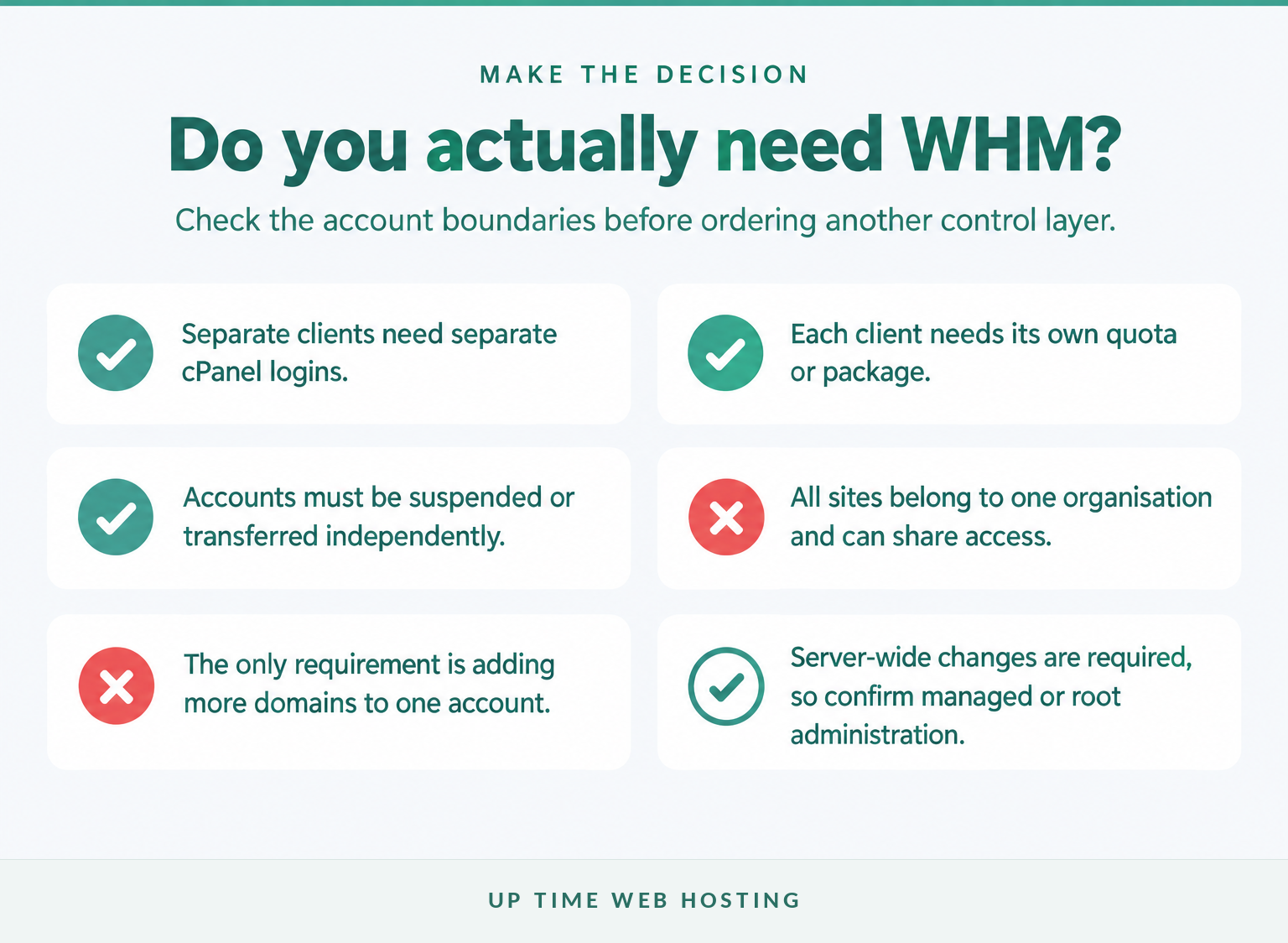
You need WHM when the websites require separate accounts, owners, limits or support arrangements. The number of websites alone does not decide it, because one cPanel account can support multiple domains when the hosting plan allows them.
Use these three scenarios as a practical guide:
- Several sites for one organisation: A multi-domain cPanel account may be simpler when the same people own every site, accept shared access and understand that the sites share an account boundary.
- Sites for separate clients: WHM is usually the cleaner choice because each client receives a separate cPanel account, login and package.
- A need to change the whole server: Reseller WHM may not be enough. Server software, operating-system settings and unrestricted service control belong to root administration or a managed hosting provider.
Account separation also makes offboarding clearer. A client's cPanel account can be backed up, transferred or removed without first separating it from unrelated sites. This is one reason an agency's approach to managing multiple websites should consider ownership and access, not just convenience.
Do not order WHM solely because a dashboard appears more powerful. Extra controls create extra responsibilities, and a poorly structured reseller account can be harder to support than a well-chosen multi-domain plan.
The number of websites matters less than whether they need separate owners, logins, limits and support boundaries.
What can a reseller actually do in WHM?
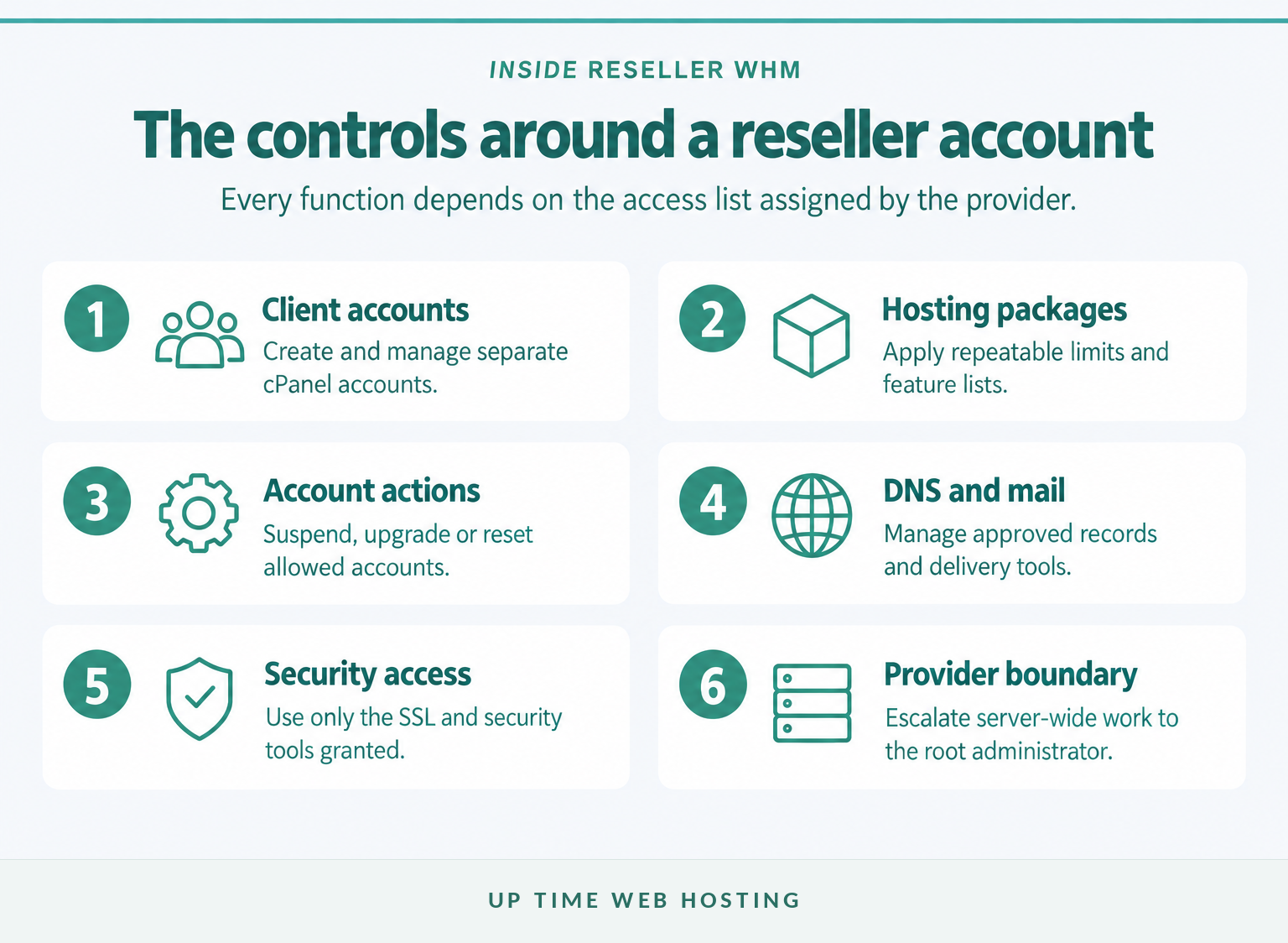
A reseller can manage the cPanel accounts it owns, but only through privileges granted by the hosting provider. Account creation, package management, DNS tools and support functions may be available, restricted or hidden according to the provider's access-control settings.
The cPanel guide to reseller accounts, last modified in July 2026, describes a reseller as a cPanel account owner that allocates purchased server resources to other cPanel accounts. The guide also confirms that reseller users receive a limited WHM interface rather than automatic access to every server feature.
Depending on the assigned privileges, a reseller may be able to:
- create and terminate cPanel accounts;
- suspend and unsuspend accounts it owns;
- create packages and assign resource limits;
- change account passwords and open temporary user sessions;
- manage DNS records, MX entries and SSL functions;
- view account information and email-delivery reports;
- apply approved branding or interface customisation;
- create API tokens for permitted automation.
The provider controls these functions through access-control lists. cPanel's September 2026 reseller privilege documentation shows that even apparently basic actions, including package creation, account suspension and DNS editing, are individual privileges.
After the reseller creates an account, the client or agency completes ordinary site tasks inside cPanel. The guide to using cPanel day to day covers that lower administrative layer.
Reseller WHM is powerful because it manages client accounts, but every capability still depends on privileges set by the provider.
What cannot a reseller do without root access?
A reseller cannot assume it has unrestricted control of the server, other users or global services. Root access is a separate level that can change the entire system and view accounts beyond the reseller's ownership.
A standard reseller may be unable to install server software, change operating-system settings, alter global security policies, configure the full backup system or restart services. A provider can grant some global privileges, but cPanel warns that advanced and root-level permissions can bypass reseller limits or expose all accounts on the server.
That distinction matters when comparing managed reseller hosting with self-managed infrastructure. On a managed plan, the provider can retain root access and handle patches, monitoring, service configuration and security controls. The reseller then concentrates on packages, client accounts and first-line support.
If a task changes the whole server, assume the hosting provider handles it unless the plan explicitly grants that privilege.
Register your new domain name at competitive market prices including free domain add-ons like privacy, DNS Hosting, Custom Nameservers and Forwarding.
Always the best price and no nasty renewal price hikes.
Register A Domain Name
How should accounts, packages and resources be structured?
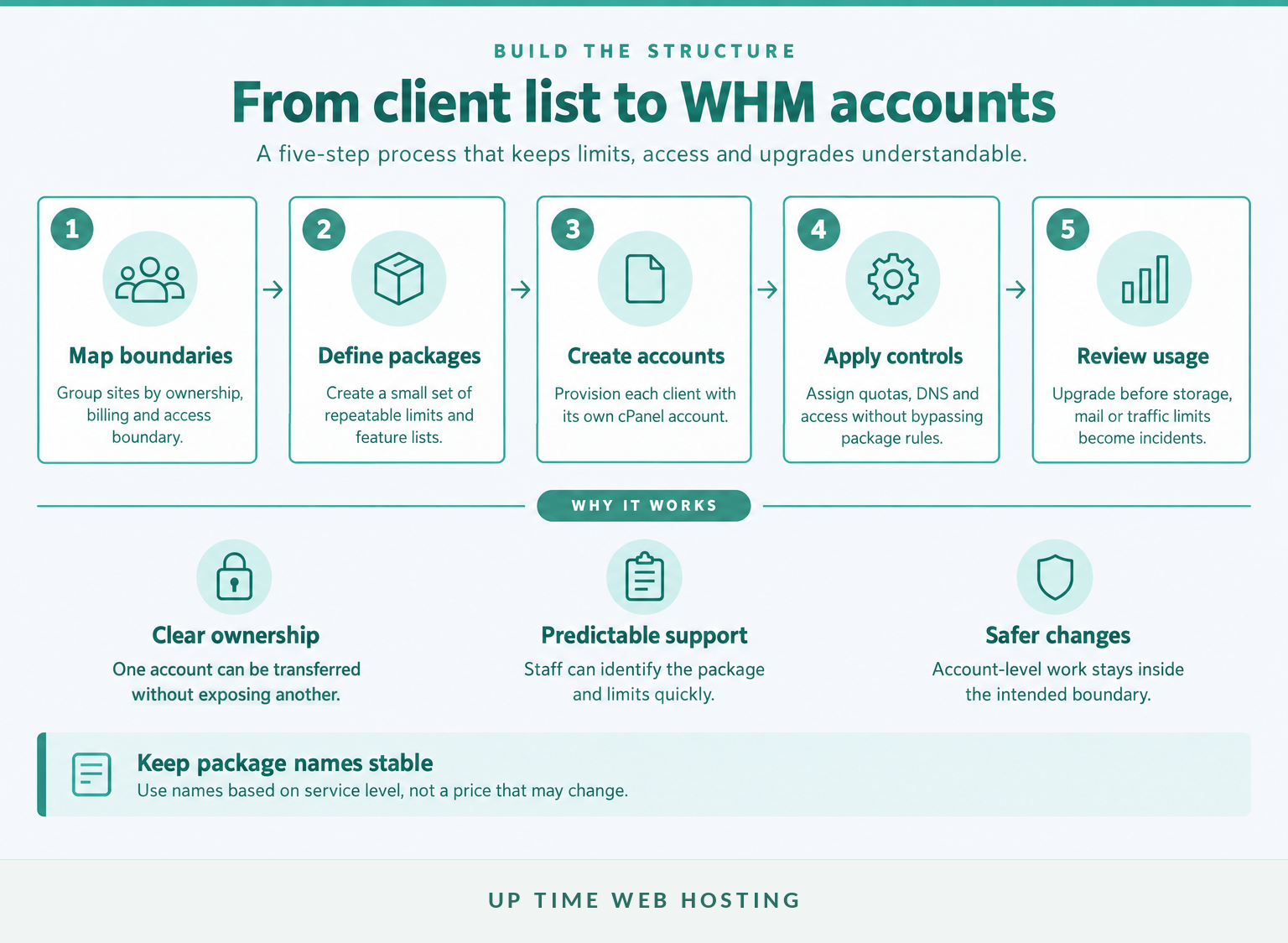
Start with one cPanel account for each genuine ownership or client boundary, then create a small set of repeatable packages. The goal is predictable administration, not the largest possible menu of plans.
The September 2026 Add a Package documentation lists limits for disk space, monthly bandwidth, email accounts, databases, domains and other account features. It also recommends using fewer packages with short names and warns that package names cannot be changed later.
A practical setup process is:
- Map account boundaries. Separate clients, billing owners and teams that should not share administrative access.
- Define a small package set. For example, create entry, standard and high-resource packages rather than a custom package for every client.
- Set understandable limits. Record disk, bandwidth, mail, database and domain allowances in language the client can understand.
- Provision the account. Assign the package, primary domain, contact details and approved features when creating the cPanel account.
- Review real usage. Upgrade a client before storage, mail or traffic limits become a service incident.
Avoid putting a price in the package name. A package called agency-standard can survive a price change, while plan-49 becomes misleading as soon as billing changes.
Also ask how CPU, memory and input/output limits are controlled. WHM package fields and server-level resource controls are not identical, and the available settings depend on the provider's operating system, plugins and reseller permissions.
A clean reseller setup uses one account per client, a small package set and limits that can be explained before a problem occurs.
Who is responsible for security, backups and client support?
WHM divides administration into layers, but it does not remove responsibility. The hosting agreement should state which tasks belong to the provider, the reseller and the client before the first account is created.
On a self-administered server, backups do not become reliable merely because WHM has a backup menu. cPanel's 2026 Backup Configuration documentation says scheduled backups must be enabled and strongly recommends a remote destination. A managed provider may configure this on the reseller's behalf, but restore scope and retention still need to be checked.
| Responsibility | Usually handled by | What to confirm |
|---|---|---|
| Server operating system and control-panel updates | Provider on a managed plan, or root administrator | Update schedule and maintenance process |
| Creating accounts and assigning packages | Reseller | Which WHM privileges are enabled |
| Website code, CMS updates and client content | Client or agency | Maintenance agreement and access ownership |
| Backup schedule and off-server storage | Provider or root administrator | Frequency, retention, locations and exclusions |
| Testing or requesting a restore | Shared between provider and reseller | Restore method, cost and expected response time |
| First-line support for end clients | Reseller | Whether the provider supports only the reseller or also the end client |
| Server-level incident response | Provider or root administrator | Escalation path and monitoring coverage |
A backup icon is not evidence that a restorable copy exists. Ask for the schedule, retention period, storage location and restore procedure, then test a restore before relying on it for a client promise.
Client support needs the same clarity. Many managed reseller providers support the reseller rather than the reseller's customers. The agency remains responsible for translating client reports, checking the account and escalating a genuine server issue with enough detail for the provider to act.
Managed reseller hosting works only when the provider, reseller and client each know which layer they own.
Experience Microsoft 365 Business Standard for free for 30 days.
Up to 25 users with full access to email, OneDrive and Teams. Includes full versions of desktop apps of Outlook, Word, Excel, PowerPoint and more.
Try Microsoft 365
How do WHM login, downloads and licensing work?
WHM is normally accessed in a browser rather than installed on an agency computer. The secure WHM service commonly uses port 2087, and only a root user or an account with reseller privileges can sign in.
The July 2026 cPanel login documentation gives the secure format as https://server-address:2087. Use the login address supplied by the hosting provider rather than guessing a server hostname, and store reseller credentials in a password manager.
Two-factor authentication should be enabled where the provider supports it. cPanel's July 2026 WHM two-factor authentication guide explains that the server policy must be enabled before users can configure time-based security codes. Reseller availability can also depend on privileges.
For a hosted reseller customer, there is usually no separate WebHost Manager download for a laptop. The server owner or managed provider installs and licenses cPanel & WHM, while the reseller receives browser access to approved functions.
What does WHM cost in 2026?
WHM does not have one universal retail price. A reseller plan may include the software licence, server, management and security, while a business licensing its own server pays separately for infrastructure and administration.
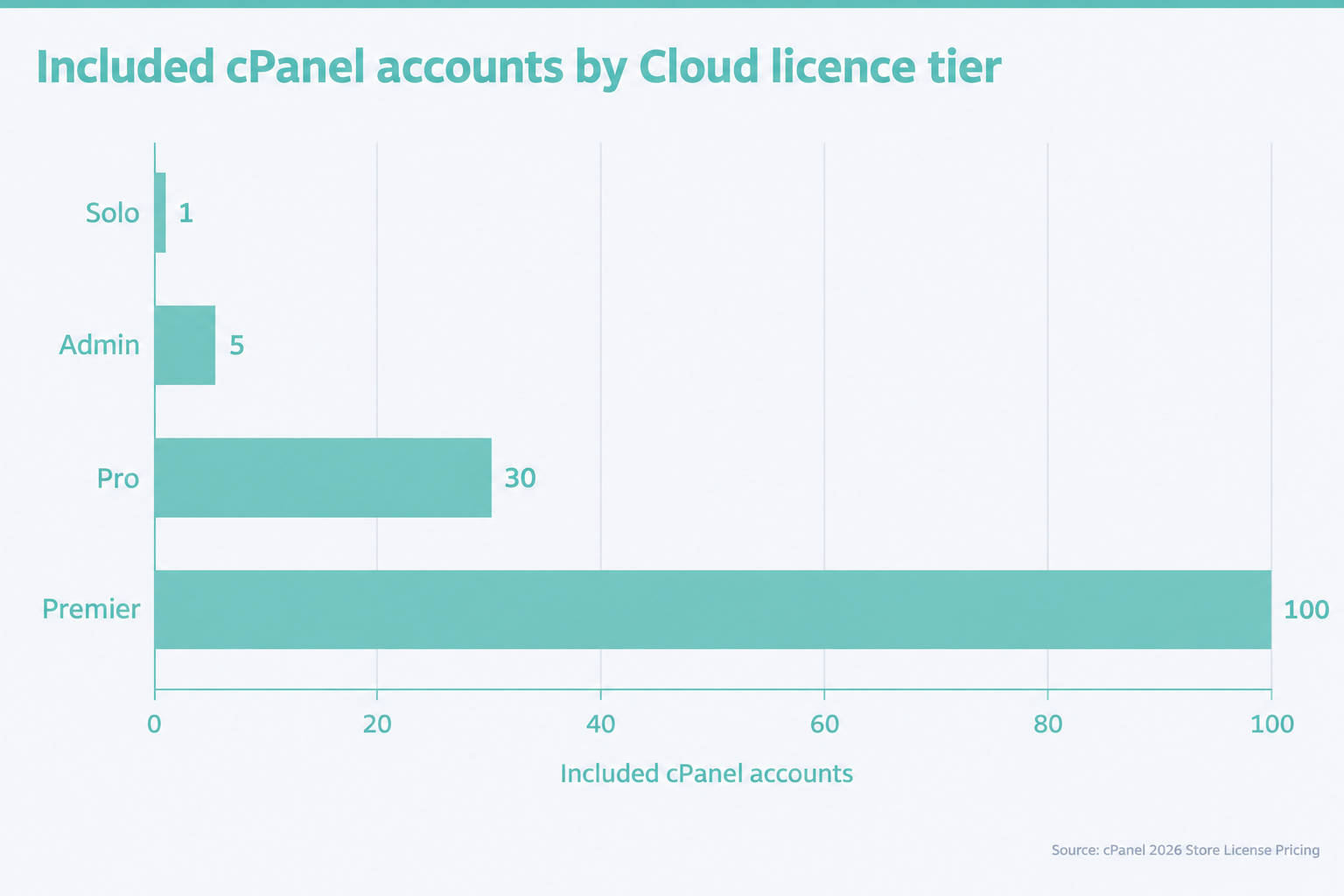
As at 16 November 2026, cPanel's direct Store pricing lists these Cloud licence prices:
- Solo: US$29.99 per month for one cPanel account.
- Admin: US$35.99 per month for up to five accounts.
- Pro: US$53.99 per month for up to 30 accounts.
- Premier: US$69.99 per month for 100 accounts, plus US$0.49 for each account above 100.
These are direct software licence prices in US dollars. They do not include an Australian server, GST treatment, backups, monitoring, a security stack, migration work or managed support, so they should not be compared with a managed reseller price as if the products were identical.
WHM access is browser-based, and its real cost depends on whether the licence and server management are already included.
When is reseller hosting the right next step?
Reseller hosting is appropriate when separate accounts and repeatable administration have become part of the service being delivered. It is not automatically necessary for every developer with several websites.
Choose the hosting layer that matches the work:
- Ordinary cPanel hosting suits one organisation, one administrative boundary or a small collection of related sites that can share access and resources.
- cPanel reseller hosting with WHM suits agencies, designers and resellers that need separate client accounts, packages, branding and controlled delegation.
- A managed VPS with WHM suits workloads that need more server resources, privacy or configuration while still relying on the provider for root-level management.
Consider future offboarding as well as onboarding. If a client may request its own backup, transfer or credentials, creating a separate cPanel account from the start is usually easier than separating a multi-domain account later.
Reseller hosting is the right step when account separation and repeatable administration matter more than simply adding another domain.
How should an Australian agency choose a WHM hosting plan?
Choose a WHM plan by its account boundaries, included management and resource limits, not merely by the presence of the WHM logo. Two plans can provide the same interface while placing very different responsibilities on the reseller.
Check these points before ordering:
- Client account allowance: Confirm the included number of cPanel accounts and the cost of adding more.
- Server resources: Compare CPU, memory, storage and data transfer with the combined needs of client sites.
- Resource isolation: Ask how one busy or compromised account is prevented from affecting others.
- Australian infrastructure: Confirm the location of primary data, backups and support when local hosting matters to the clients.
- Security inclusions: Identify the firewall, malware protection, account isolation and monitoring supplied by the provider.
- Backups and restores: Check frequency, retention, off-server storage and who can perform a restore.
- Migration assistance: Confirm which account formats can be moved and whether email, DNS and databases are included.
- Support boundary: Ask whether the provider supports the reseller only or also communicates with end clients.
- Branding: Confirm which nameservers, interfaces and client-facing elements can use the agency's brand.
- Billing: Check whether prices are in Australian dollars, include GST and cover the cPanel licence.
UpTime's current Australian cPanel reseller hosting plans describe managed reseller servers with 30-account and 100-account options, CloudLinux 9, LiteSpeed, Imunify360 and 24×7 server monitoring. Compare those inclusions with the account map and support responsibilities before selecting a plan.
Choose the plan by account boundaries, resources and support scope, not by the WHM logo alone.
What else do people ask about WebHost Manager?
What is cPanel and why do I need it?
cPanel is a browser-based dashboard for managing one hosting account, including website files, domains, email, databases, SSL and backups made available by the host. You need it when you want direct control of those day-to-day tasks without command-line access. WHM sits above cPanel when multiple separate accounts must be managed.
What does a webhost do?
A webhost provides the server infrastructure and network connection that keep website files, databases and email services available online. Depending on the plan, the host may also handle monitoring, security, backups, software updates and support. The contract should state which server tasks are included and which remain the customer's responsibility.
How do I find out who my webhost is?
Start with the hosting invoice, welcome email or client portal, because the company billing the service is usually the host or reseller. If that is unclear, check the domain's nameservers and website IP address, then compare them with provider records. A reseller's brand may appear instead of the underlying infrastructure provider.
What is WHM used for?
WHM is used to create and manage multiple cPanel accounts, define hosting packages, set quotas, control reseller permissions and perform allowed account-level actions such as suspension, password changes or DNS management. Root WHM can also manage the whole server, but reseller WHM normally exposes only the functions approved by the hosting provider.
Most WHM confusion disappears once cPanel, the web host and the server are treated as three different layers.
What should you do next?
List every website and client, then mark which ones need separate credentials, quotas, billing and support boundaries. If most require separation, WHM is the appropriate layer; if they all belong to one organisation and can share an account, an ordinary cPanel plan may be enough.
Map the account boundaries first, then buy the level of control that matches them.