A customer standing in a Perth car park, thumb on a slow mobile link, is a harsher test than a lab bench. A recent Australian SME survey reported that 42% of businesses planned a website redesign between late 2025 and the end of 2026, while more than 65% of first customer interactions occurred on mobile devices, according to national figures on Australian small-business website redesigns. That is the useful frame for LiteSpeed vs Apache vs Nginx. The winner is the stack that still feels acceptable on a cold cache and a long mobile path, and that you can rebuild after an incident.
Table of Contents
- Why a Faster Server Is Not Always the Win
- LiteSpeed Apache and Nginx at a Glance
- How Each Server Behaves Under Real Traffic
- Configuration Compatibility and Everyday Admin
- Security Checks That Outrank the Server Brand
- Which Server Fits Each Australian Workload
- Confirm Recovery Before You Move DNS

Performance you can feel, backed by clients who depend on it. Read how our support and uptime create long‑term customer success.Power Your Business with Better Hosting
Why a Faster Server Is Not Always the Win
Benchmark charts crown a winner in requests per second. A local services firm in Adelaide refreshing its mobile-first site faces a different test. The chart never opened a page on a mid-range phone, never hit a logged-in screen, and never asked what happens when the server has to be restored on a Monday morning. For an Australian business weighing LiteSpeed, Apache and Nginx, the better question is which stack still responds well on a cache miss and a long mobile path, and which one you can rebuild after an incident.
Before comparing anything, separate LiteSpeed Enterprise from OpenLiteSpeed. They are different products. Enterprise is the commercial server: on our cPanel plans it runs with LSCache on CloudLinux OS Shared Pro. OpenLiteSpeed is a separate build, and some dedicated WordPress servers include it alongside WordPress Toolkit, built-in caching, email and SSL certificates. Tuning advice written for one does not automatically apply to the other, which is where many comparisons go wrong.
Three decisions settle the choice.
- Cached WordPress: You want server-level cache, high concurrency and very little hand-written config per site.
- Legacy PHP: The app is full of modules and
.htaccessrules that must keep working. - A reverse proxy an engineer will maintain: Static files, PHP and cache bypass are designed in versioned server config.
The scan table in the next section is only a map. Configuration, the security checks, and a workload match come after it. If the in-house developer is already at capacity, an engineering partner at Southern Tier Resources can own the migration steps while you keep the hosting decision. For the checks you can run this week, our guide on how to reduce server response time covers HTTPS redirect behaviour and what a slow origin feels like. When you want the server and cache included rather than installed by hand, our Australian cPanel and WordPress plans are the practical starting point.
LiteSpeed Apache and Nginx at a Glance
| Criterion | LiteSpeed | Apache | Nginx |
|---|---|---|---|
| Execution model | Event-driven, Apache-compatible config | Process or worker MPM, often prefork or event | Event-driven and asynchronous |
| Caching | Built-in LSCache at the server | Modules, plugins or a front cache | FastCGI or proxy cache, designed per site |
| HTTP/3 | Native QUIC support | Usually a CDN or front proxy on 2.4 | Available only if the build and config enable it |
| Per-directory rules | Reads .htaccess | Native .htaccess | No .htaccess; rules live in the server config |
| Typical admin | Control panel plus optional cache plugin | Control panel or module config | Hand-written server blocks |
| Licence shape | Enterprise is commercial; OpenLiteSpeed is a separate build | Open source | Open source |
| Shortlist it when | Cached WordPress and high concurrency with little per-site tuning | Legacy modules and .htaccess-heavy apps | Engineers want precise proxy and cache control |
Caching HTTP/3 and directory rules
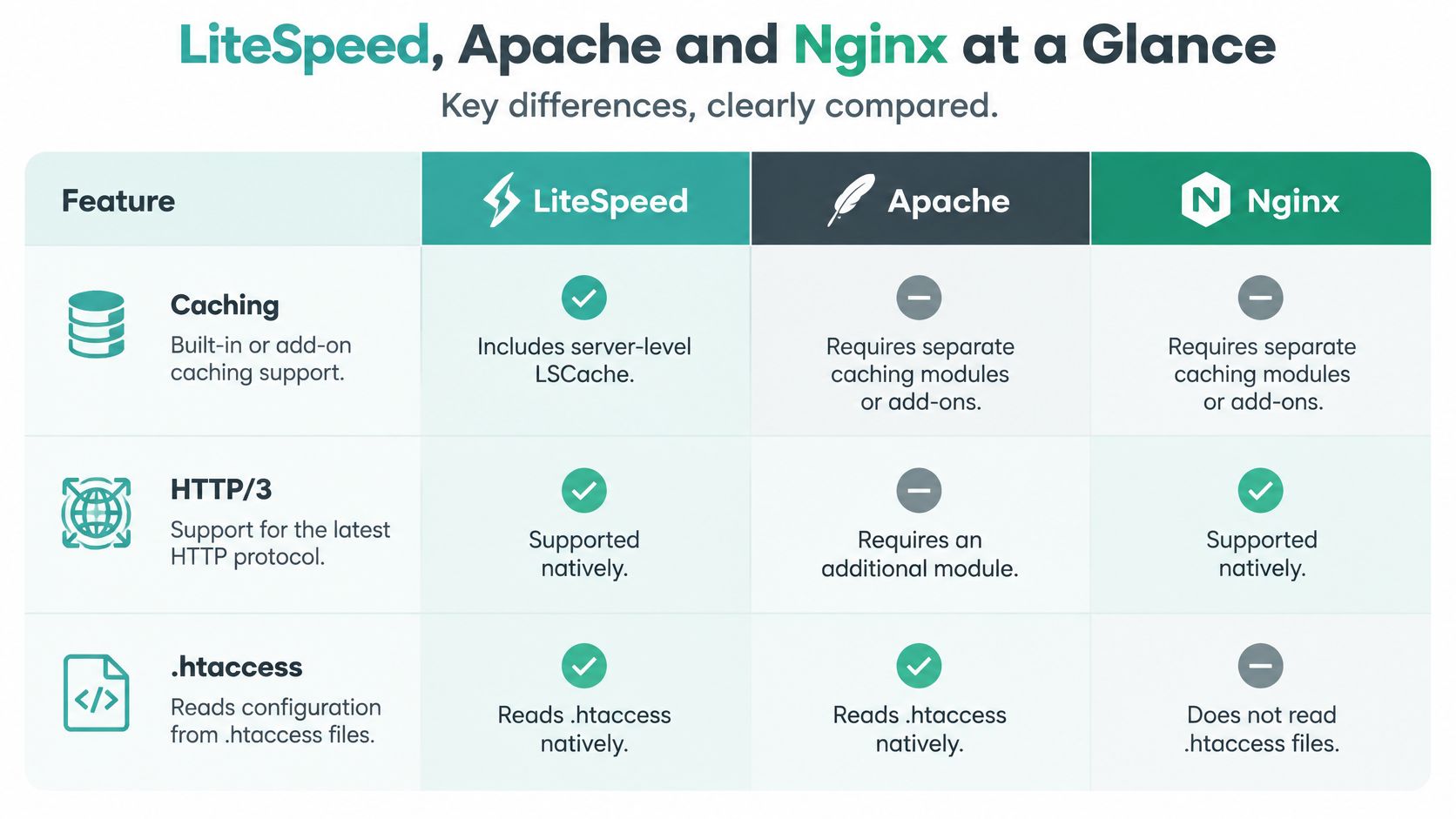
Read three rows first. Caching is the one visitors feel on a mobile link from a Sydney train or a hotel network in Perth. LiteSpeed ships LSCache at the server, so a public WordPress page can be stored and served without waking PHP. Apache waits on a module, a plugin or a cache in front of it. Nginx can be excellent, but the FastCGI or proxy cache is something you design in the server config for each site.
HTTP/3 works like a better road layout for repeat journeys, but it only helps when both ends can use it. LiteSpeed includes native QUIC support. Apache 2.4 usually reaches HTTP/3 through a CDN or a front proxy. Nginx offers it only when that build and that config turn it on. Per-directory rules decide whether a move is an afternoon or a project. LiteSpeed and Apache read .htaccess. Nginx does not, so rewrites, hotlink rules and access limits live in the server block or they stop.
Free LiteSpeed plugins are available for WordPress, Joomla and Drupal to fine-tune performance. Our cPanel hosting uses the LiteSpeed web server, with built-in caching and complete cache control available in cPanel. Our cPanel hosting also uses MariaDB and a 40Gbit connection speed, which matters when many visitors hit pages that still need PHP and database work.
What an Australian install mix is for
Beside the table, not instead of it, sits one local snapshot. In a 2020 look at its own Australian cloud-hosting users, Cloudlets found Apache PHP at 32% of installations, LiteSpeed at 27% and Nginx at 13%. That is not a national market share. It is an operational mix from an Australian hosting environment.
The practical reading is straightforward. Apache still matters where older PHP apps, modules and .htaccess must keep working. LiteSpeed is the migration path that keeps much of that Apache-style configuration and adds an event-driven model plus server-level cache. Nginx was the smaller share in that set, and it remains the specialist tool for reverse-proxy, static and high-concurrency work.
Requests per second are not a national ranking. Workload and whether your team can support the stack matter more than a single score.
Test from Sydney, Melbourne, Brisbane and Perth. Distance, TLS handshake time, cache-hit ratio, PHP, database latency and cache warm-up can dwarf the gap between server brands. Use the same five cases everywhere: uncached WordPress, cached WordPress, static files, concurrent uncached PHP, and a restart or failover while load is on.
Host your website with our 5-star rated, cPanel website hosting plans.
Super fast servers, with security included and hosted in your choice of Australian Data Center.
View cPanel Plans
How Each Server Behaves Under Real Traffic
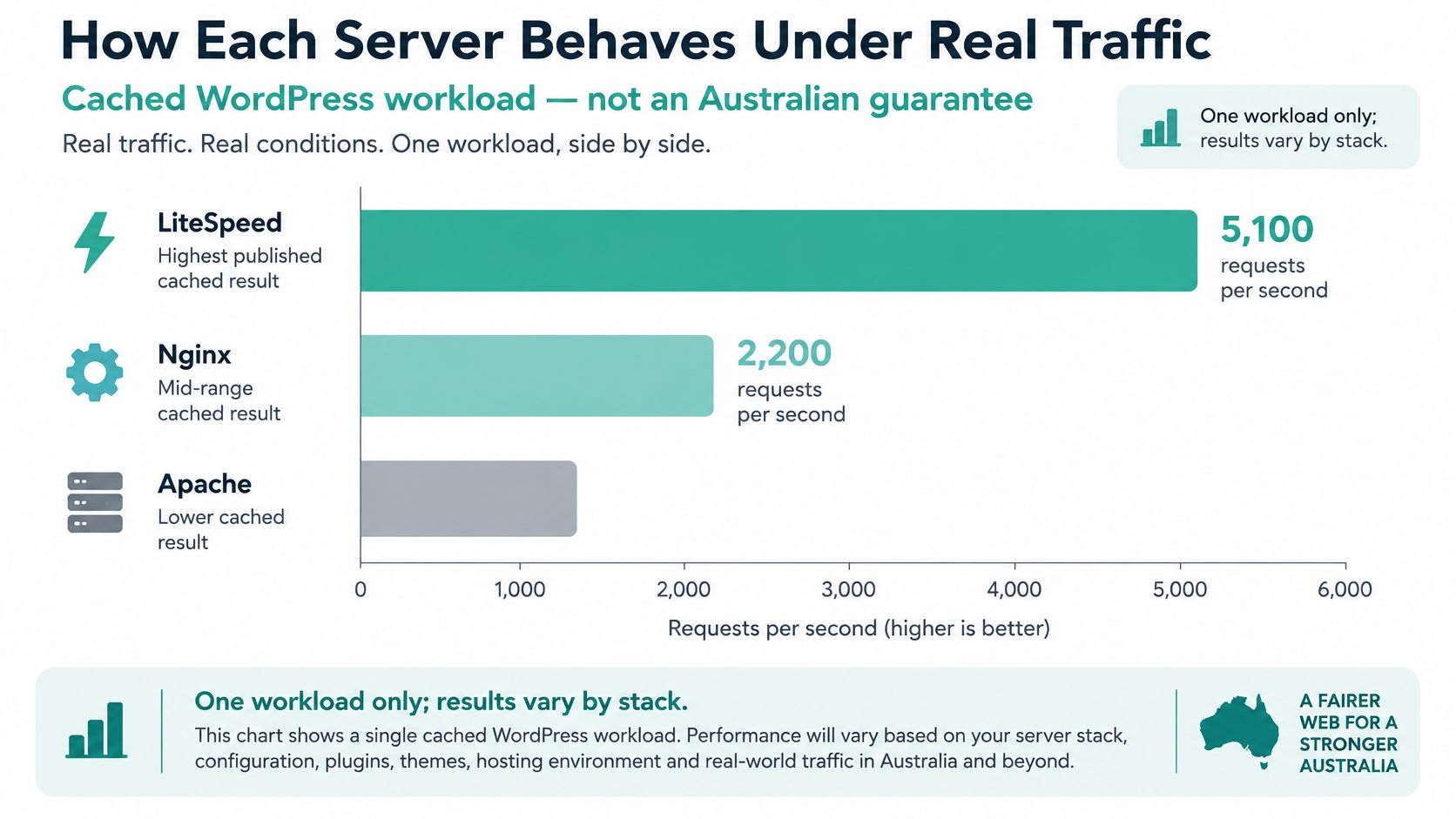
One published cached-WordPress test is worth quoting, and only as that workload. Independent benchmark claims report approximately 5,100 requests per second for cached WordPress on LiteSpeed, versus about 2,200 on Nginx and 900 on Apache, as summarised in an Nginx and LiteSpeed comparison. Those counts are not an Australian guarantee. They were taken against a warm cache, so they measure how little work the server does after a hit, not how a shopper in Perth feels on a first visit.
Hold PHP version, database state, TLS settings and cache policy identical, then watch three cases.
A warm cache is not a cold visit
Cache hit. The gap in that test is real because LSCache is already part of LiteSpeed. Nginx only matches it after someone writes FastCGI or proxy rules. Apache usually waits on a plugin or a cache in front. Every Australian WordPress Hosting on cPanel plan we offer includes that built-in LiteSpeed server cache, so a brochure site isn't waiting on a custom cache design.
Cache miss, logged-in WordPress, or a cart. PHP and the database run on all three. The requests-per-second gap shrinks. Plugins, slow queries and opcache decide the wait. A logged-in trade portal and a public homepage are different sites from the server's point of view, even when they share a theme.
Mobile path from Sydney to Perth. Handshake time and packet loss matter more than the origin brand. HTTP/3 uses QUIC rather than TCP, which cuts connection setup delay and copes better when a mobile link drops packets. LiteSpeed has that natively. Nginx has it only if the build and config enable it. Apache 2.4 generally relies on a CDN or front proxy. Report median time, the slow tail, origin response and cache-hit ratio. A requests-per-second bar doesn't show a regional shopper.
A lighter image and a faster query can beat a server swap.
| Workload | LiteSpeed | Nginx | Apache | What usually dominates |
|---|---|---|---|---|
| Cached WordPress | About 5,100 requests per second in one published test | About 2,200 | About 900 | Cache-hit ratio, not the brand alone |
| Uncached or logged-in WordPress | Event model helps; PHP still runs | Same PHP constraint | Same PHP constraint | Plugins, queries and opcache |
| Static files | Strong once cached | Excellent as a file or proxy cache | Adequate, often behind another cache | Image weight and CDN |
| Concurrent uncached PHP | Handles many connections in an event loop | Same event-driven pattern | Workers can queue sooner | PHP version and database latency |
| Mobile path Sydney to Perth | Native HTTP/3 and QUIC | HTTP/3 only if built and enabled | HTTP/3 usually via CDN or proxy | Handshake time and packet loss |
Prioritise LiteSpeed when managed WordPress caching, high concurrency and little per-site tuning matter. Choose Nginx when an engineer needs precise reverse-proxy and cache-control design. Keep Apache where legacy modules or .htaccess-heavy apps outweigh peak efficiency. Before you blame the server, check whether the page is even cacheable, and size the pipe with a plain look at how much bandwidth a website needs. Re-test with Australian-region monitoring, not a single offshore lab.
Configuration Compatibility and Everyday Admin
Moving a brochure site off shared Apache
Picture a two-page services site on shared Apache, with a handful of redirects in .htaccess and PHP that a plugin last touched two years ago. The move onto a managed LiteSpeed plan is usually small if you keep the order tight.
- Copy the site and database, and keep the
.htaccessredirects in place. LiteSpeed reads much of the Apache layout, so those rules are the thing you're trying not to rewrite by hand. - Confirm PHP is the same major version. A jump from 7.4 to 8.x in the same window as a server change makes every bug look like a hosting bug.
- If the site is WordPress, Joomla or Drupal, install the free LiteSpeed cache plugin and set the public pages to cache. There are free plugins for all three, used to fine-tune what the server cache already provides.
- Purge, then reload one URL that was not cached. View source or the response headers and confirm the page came from cache on the second load.
Apache's everyday advantage is named modules and AllowOverride, which is why that .htaccess file existed in the first place. The cost is extra work on each request while .htaccess is enabled, because the server checks directories on the way to the file. That cost is acceptable for a legacy app. It is a poor default for a huge tree of folders you never customise.
A self-managed OpenLiteSpeed test box is not the Enterprise server on a panel plan. Don't trial one and assume the other will behave the same way once the site is on cPanel.
Putting Nginx in front of the app
The Nginx move is larger, because Nginx ignores .htaccess. Every rewrite, hotlink rule and access limit has to be rewritten into the server block. If nobody does that, the rule doesn't error in a helpful way. It stops.
A developer placing Nginx in front of one app can keep the file short. One location serves static files with a long cache lifetime. One location passes PHP to PHP-FPM. An explicit bypass skips the cache when a cart or login cookie is present. Miss that third location and the staging site looks perfect while production serves a cached cart to the next visitor.
After any change, three URLs must still behave: one public page, one logged-in page, and one old redirect. Our WordPress hosting on cPanel already has the server and cache plugin path in place, so you're confirming behaviour rather than assembling the stack. The web hosting control panel notes are the right checklist for which rewrite rules you can see and edit after a panel migration.
Security Checks That Outrank the Server Brand
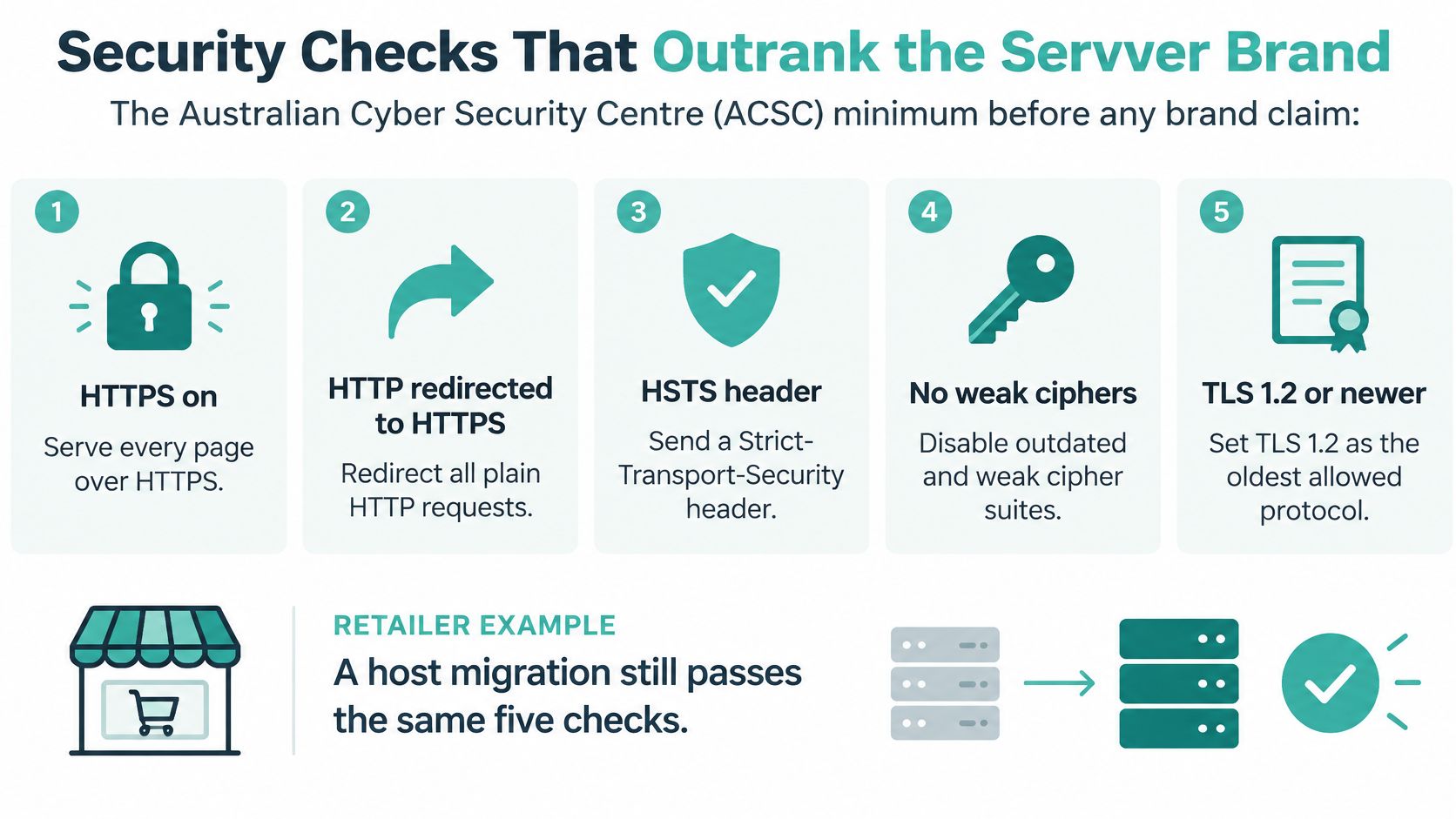
A faster response time does not pass a security review. The ACSC website security guidance sets the baseline encryption posture every server brand has to meet: HTTPS enabled, HTTP redirected to HTTPS, an HSTS header sent, no weak or insecure cipher suites, and TLS 1.2 or higher as the oldest protocol on offer. A customer on a congested mobile link only experiences whether the page loads safely. They never see which daemon answered.
A pass fail test that ignores the logo
Say a retailer moves from Apache to Nginx and the origin time drops. The move still fails if TLS 1.0 stays on or the new virtual host never sends HSTS. The same retest applies when a panel creates LiteSpeed virtual hosts and certificates for you. Automation issues the certificate. Someone still has to check what was issued.
Walk the five items in order. Force HTTPS on every URL, not only the homepage. Confirm the redirect. Inspect a response for the Strict-Transport-Security header. Confirm nothing older than TLS 1.2 is offered. Review the cipher list instead of trusting a panel default. The website security checklist turns that into a repeatable procedure and adds a backup restore test, not only header checks.
That same guidance gives owners the questions to put to a host before a migration rather than after it. Are backups performed, how often, and where are the off-site copies stored? Is there malware scanning, a firewall, encryption, multi-factor access and denial-of-service protection? HTTPS exists to encrypt sensitive information such as passwords and payment-card details in transit. Our economy plans include Let's Encrypt SSL, a firewall with DDoS protection, PHP up to 8.x, Softaculous, LiteSpeed, SSH, CloudLinux Pro and AccelerateWP. Included features still need the same retest: confirm the redirect, and confirm a trial restore has completed once.
Backups origin access and the domain
A community WordPress site can serve a cached copy on LiteSpeed, Apache or Nginx and do less work during a spike. The cache does not hide the origin. ACSC denial-of-service guidance.pdf) tells owners to avoid publishing the origin IP, to firewall the origin so only authorised networks or a CDN can connect, to use cloud-based mitigation, and to watch availability, traffic and resources in real time. A static, low-processing version of the site belongs in the same plan.
For an Australian small business this is the continuity test that decides the outcome. When a spike or an attack arrives, the visitor on a phone outside town only knows whether the page still loads and the order still completes. No server badge on a plan page does that work for you.
DNS is a separate control. Changing web server does not sign the zone. ACSC domain guidance.pdf) describes DNSSEC as cryptographic integrity and a chain of trust against impersonation and cache poisoning, when validating resolvers are in use. For a .au name, the registrant or the technical contact submits the request. Test on a secondary domain first, then enable it on the production name. Keep the domain in the customer's own name so that request can be made.
Server branding does not replace network filtering or a restorable backup.
| Check | Pass condition | Common miss |
|---|---|---|
| HTTPS | Sensitive pages encrypted | Certificate issued but not forced |
| Redirect | HTTP sent to HTTPS | Only the homepage redirects |
| HSTS | Header present on responses | Header dropped on the new vhost |
| TLS version | 1.2 or newer is the oldest | Old protocols left on after a speed migration |
| Ciphers | No weak or insecure suites | Panel default never reviewed |
| Backups | Frequent, off-site, and actually restorable | Copies only on the same server |
| Origin under load | Firewall limits who can reach the server IP | CDN added but origin IP still public |
| DNSSEC on a .au name | Registrant or technical contact requests it after a secondary-domain test | Assumed fixed because the web server changed |
Register your new domain name at competitive market prices including free domain add-ons like privacy, DNS Hosting, Custom Nameservers and Forwarding.
Always the best price and no nasty renewal price hikes.
Register A Domain Name
Which Server Fits Each Australian Workload

Match the site you have, not the benchmark you liked.
A single WordPress brochure or local-services site, plugins and the odd campaign included, fits LiteSpeed. Server cache is already there, and a cache plugin for WordPress, Joomla or Drupal covers the fine detail without a hand-written server block. It still feels slow if the cache never warms, or if every page is personalised and nothing is allowed to cache. Campaign landing pages should be public and cacheable. Account pages should not.
A long-running custom PHP app full of .htaccess rewrites and older modules should stay on Apache until someone budgets a rewrite. A forced Nginx move breaks rules nobody documented. Apache's failure mode is different. Leave AllowOverride on across a huge file tree and the server stays busy checking directories that never held a custom rule.
Several apps behind one front door fit Nginx, if an engineer will keep the config in version control. Static files split from PHP, and a cookie bypass protects carts and member areas. Nginx feels fine in staging and wrong in production when a login cookie is cached and the next visitor receives someone else's session fragment. That bypass rule is the whole design, not a footnote.
Standard website traffic on our plans is unlimited under a fair-use policy. Optional premium CDN traffic is usage-based, with 1GB a month included. That is a capacity note, not a fourth web server. A CDN doesn't replace the origin choice above.
The Windows stack this trio does not cover
Classic ASP, ASP.NET or .NET Core with MSSQL sits outside LiteSpeed, Apache and Nginx. Our ASP.NET hosting runs on a Windows server with classic ASP, ASP.NET and PHP side by side, plus MySQL and MSSQL. Deployment is Web Deploy or Git, with server logs and a configurable web application firewall. Don't spend a week translating web.config into an Nginx location block. Put the app on the Windows stack it was built for, and keep PHP on that same server only where you need it.
Confirm Recovery Before You Move DNS
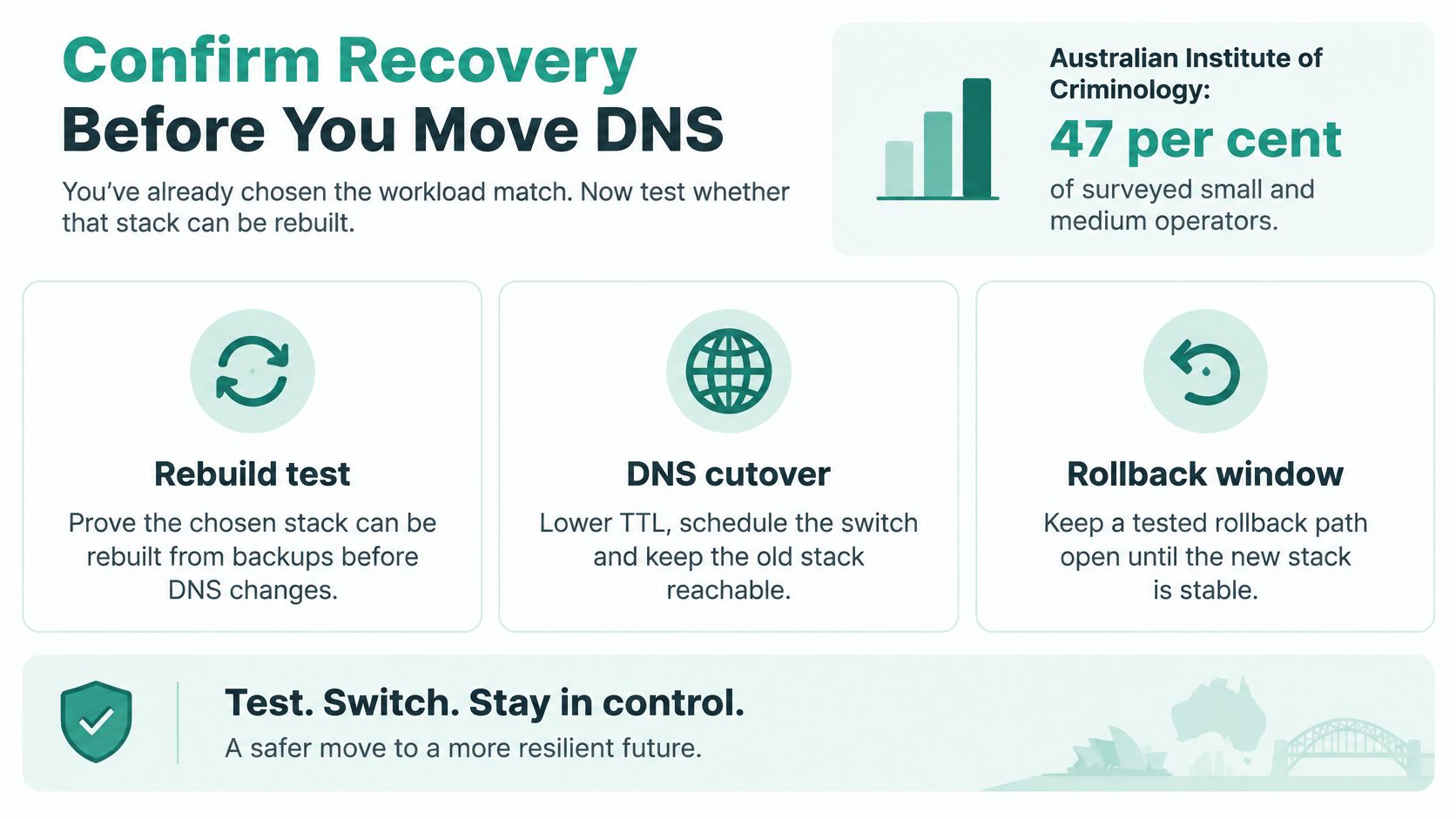
The workload match is already chosen. The remaining question is whether that stack can be rebuilt. Australian Institute of Criminology data indicates that 47% of surveyed small and medium-business operators affected by cybercrime reported at least one business impact. Across all respondents, an estimated 25% experienced some cybercrime-related impact in the preceding 12 months. Consequences included operational or trading disruption, websites not functioning, repair costs, information loss, and reputational or revenue damage.
A slightly slower stack you can rebuild beats a faster stack nobody can recover. Milliseconds don't invoice your customers. A site that stays down does.
- Confirm the chosen stack is monitored, patched and firewalled. A current PHP line and a firewall you have seen in the panel matter more than the logo on the binary.
- Confirm backups run often, sit off-site, and have been restored in a test. A copy on the same disk is not a backup you can use after the disk fails.
- Before you change DNS, follow a written migration path and ask for three proofs: the HTTPS redirect, the HSTS header, and one successful restore. Our guide on how to migrate a website to a new host is the sequence to use so the old stack stays reachable until the new one is stable.
If the match was managed LiteSpeed in Australia, UpTime Web Hosting runs cPanel hosting on servers in Sydney, Melbourne, Brisbane and Perth, with LiteSpeed Enterprise and LSCache. Use the cPanel and WordPress plans for fit, and keep the .au name in the customer's own name so registrar control doesn't move by accident.
UpTime Web Hosting runs Australian cPanel, WordPress and Windows hosting with LiteSpeed where the stack calls for it, free SSL, malware scanning, DDoS-protected firewalls and encrypted off-site nightly backups. If you're weighing LiteSpeed, Apache and Nginx for a site your customers open on a phone, start from a plan that already includes the server cache, the certificate and a restore path rather than assembling those after go-live. Visit UpTime Web Hosting to match the workload and confirm recovery before you move DNS.