A customer in Parramatta needs an electrician. Another in Geelong wants a same-day locksmith. Someone in inner Brisbane is looking for a café that's open now. They won't browse ten websites, compare your brochure, and then make a calm, considered choice. They'll search, scan the local results, check reviews, glance at hours, and tap the listing that feels most trustworthy.
That's where your Google local business presence wins or loses the job.
For many Australian businesses, the Google Business Profile is the first real sales conversation. It tells people whether you're nearby, whether you're open, whether others trust you, and whether calling you looks like a safe decision. Google itself positions Business Profile as a way to create, personalise, and grow your presence so people who find you on Search and Maps can become customers through Google Business Profile.
Table of Contents
- Why Your Google Local Business Profile is Your Best Mate
- Creating and Verifying Your Australian Business Profile
- Optimising Your Core Profile for Local Discovery
- Connecting Your UpTime Hosted Website for Maximum SEO
- Driving Engagement with Posts Reviews and Q&A
- Managing Multiple Locations and Service Area Businesses
- Tracking Performance and Troubleshooting Common Issues

Performance you can feel, backed by clients who depend on it. Read how our support and uptime create long‑term customer success.Power Your Business with Better Hosting
Why Your Google Local Business Profile is Your Best Mate
It's 7:15 on a Wednesday morning. A plumber in Parramatta gets a “blocked drain near me” search. A patient in Geelong checks whether a clinic is open late. A family in Adelaide looks up a café before they leave the house. In each case, Google Business Profile shapes the decision before anyone reaches a homepage.
That is why this profile punches above its weight for Australian small business. It sits inside Search and Maps, captures high-intent local traffic, and answers the questions that decide whether someone calls, visits, or keeps scrolling. Google's Business Profile guidance has long pointed to strong local intent across search behaviour. For a tradie, retailer, restaurant, clinic, or service business, that means your profile often acts as the first meaningful sales conversation.
A well-built profile does more than display your details. It reduces hesitation. The customer sees your category, service area, opening hours, phone number, reviews, and directions in one place. If those details line up with a fast UpTime-hosted website on your .au domain, plus a location page with the right local schema, Google gets a consistent set of signals and the customer gets a clear next step.
That connection matters. I see businesses spend time polishing their profile while sending visitors to a slow website, a mismatched domain, or a contact page that says something different to the listing. Rankings can soften, trust drops, and conversion rates suffer. Local SEO works better as a system. Profile, domain, hosting, landing page, and structured data need to support the same story.
Why this matters in day-to-day business
A strong profile improves outcomes you can measure:
- More calls: Searchers can tap to call without hunting through your website.
- More foot traffic: Accurate map pins and trading hours help stores, clinics, salons, and hospitality venues turn searches into visits.
- Better enquiries: Clear categories, services, and business information filter out poor-fit leads.
- Less admin noise: Up-to-date hours and service details cut down repetitive “Are you open?” calls.
One weak point can slow all of this down. If verification stalls because DNS records are not set correctly, visibility gets delayed. UpTime Hosting clients can sort that faster by following this guide on adding a verification record to DNS for Google or Microsoft 365.html).
Practical rule: If a customer cannot tell who you help, where you operate, and how to contact you within a few seconds, the profile is not doing its job.
Many small businesses still treat Google local business setup as admin. Claim the listing, add a logo, tick a few boxes, and leave it alone for a year. That usually leads to missed calls, weaker local visibility, and website traffic that does not convert well. The businesses that get steady value from Google handle the profile like a revenue asset, backed by dependable hosting, a clean .au domain, and a website that confirms every local signal Google sees.
Creating and Verifying Your Australian Business Profile
The setup step isn't glamorous, but it's where many local campaigns go sideways. If the legal business name is inconsistent, the address is wrong, or verification gets tangled with the wrong Google account, you create problems that can follow the listing for months.
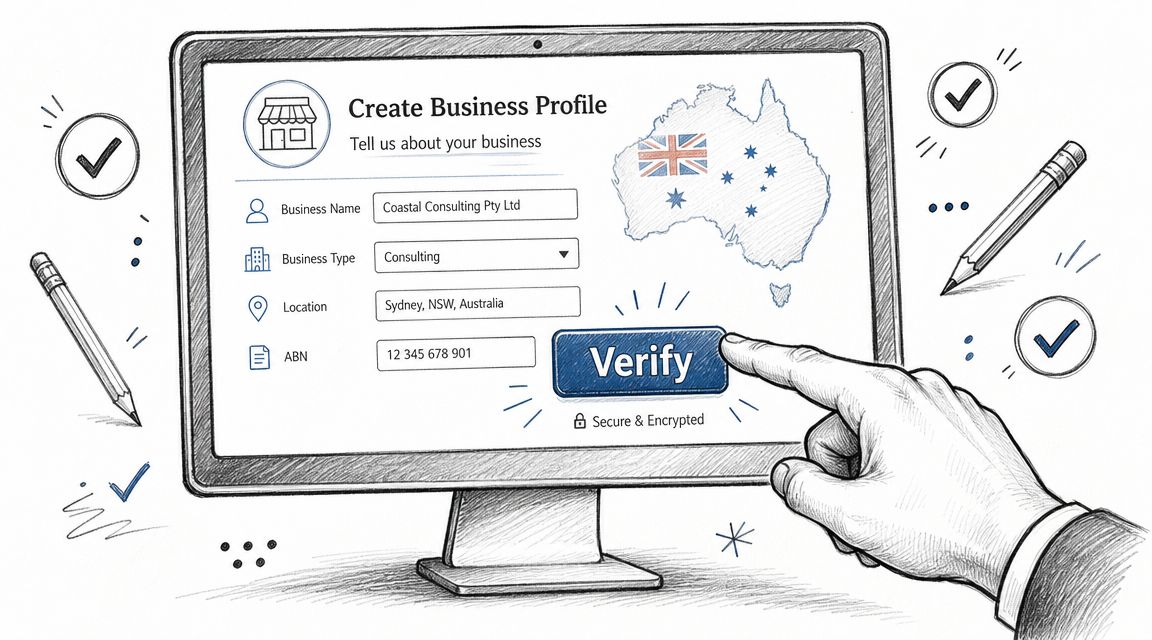
Globally, there are over 215 million Google Business listings, and one industry compilation reports that Google My Business contributes 19.2% of local search ranking factors via this Google Business listing statistics compilation. That scale tells you two things. First, you're not competing in a small directory. Second, verification and completeness aren't optional admin. They affect discoverability.
Start with the real business identity
Create or claim the profile using a business-controlled Google account, not a staff member's personal login. That sounds obvious, but many Australian businesses still end up with a profile tied to a former employee, a web developer who's moved on, or a Gmail address no one can access.
Use your actual trading name as customers know it. Don't add suburb names, service keywords, or marketing claims into the business name field unless they're part of the actual name. A profile called “Smith & Co Plumbing” should not become “Smith & Co Plumbing Sydney Emergency Hot Water Specialists” just because someone wants extra visibility.
Before you submit anything, confirm these details against your website and business documents:
- Business name: Match signage, invoices, and your website.
- Address: Use the exact customer-facing location if customers visit you.
- Phone number: Prefer a direct, monitored number.
- Website URL: Send people to the most relevant page, not always the homepage.
- Category: Pick the closest primary service, not the broadest label.
Choose the right profile type before verification
Google local business profiles usually fit into one of two structures.
- Physical location business: Customers visit your premises. Think café, dental clinic, bottle shop, salon, or accountant's office.
- Service area business: You travel to the customer. Think mobile mechanic, pest control, pressure cleaning, or home care.
If customers don't attend your address, don't force a storefront setup just because it feels more substantial. A service area business can still perform well when the profile is accurate and the service areas are properly defined.
The best setup is the one that matches how the business operates in the real world. Trying to outsmart the profile type usually creates verification and compliance issues later.
Handle verification without creating future problems
Google may offer different verification methods depending on the business and account history. You might see postcard, phone, email, or video options. The exact method isn't always your choice, so the practical job is to be ready for whichever one Google presents.
A few habits make verification smoother:
- Check mail handling: If postcard verification is offered, make sure the address can receive mail and that staff know to look for it.
- Prepare the premises: If video verification is required, have signage, tools of trade, branded vehicles, or access to the workspace ready.
- Use stable business details: Don't keep changing the name, category, or address while verification is in progress.
- Keep ownership clean: Add the right admin users after verification, not random logins during setup.
If you're also verifying other services tied to your domain, keeping your DNS records organised helps avoid confusion. UpTime customers can use this knowledge base guide on adding a verification record to DNS.html) when a platform asks for domain verification.
A common mistake is assuming verification is the finish line. It isn't. Verification only proves the business exists and that you control it. The listing still needs accurate categories, content, photos, service details, and website support before it becomes a reliable lead source.
Host your website with our 5-star rated, cPanel website hosting plans.
Super fast servers, with security included and hosted in your choice of Australian Data Center.
View cPanel Plans
Optimising Your Core Profile for Local Discovery
Once the profile is live, the essential work begins. Many businesses then either build a strong local asset or settle for a listing that looks technically complete but doesn't convert.
Local SEO practitioners consistently frame Google Business Profile optimisation as a relevance-and-trust system. The practical test is whether your profile clearly reinforces who you are, what you do, and where you do it across the profile, website, and citations, as discussed in this local SEO practitioner video.
Build relevance before you chase ranking tricks
A lot of owners want to jump straight to advanced tactics. More reviews. More posts. More updates. Those matter, but not if the core profile is muddy.
Your primary category is one of the biggest decisions in the whole setup. A Sydney café that also sells retail beans still needs to decide whether it's primarily a café, coffee shop, or roastery in Google's category system. A Brisbane electrician that mainly handles emergency callouts shouldn't bury that positioning under a broad or unrelated category.
The same applies to service areas. Don't add every suburb in a giant radius just because you can. If your team works most often in Blacktown, Penrith, and Parramatta, make the profile reflect the market you can service consistently. Broad coverage with weak operational reality usually creates poor leads and weaker local relevance.
Use this checklist to tighten every field
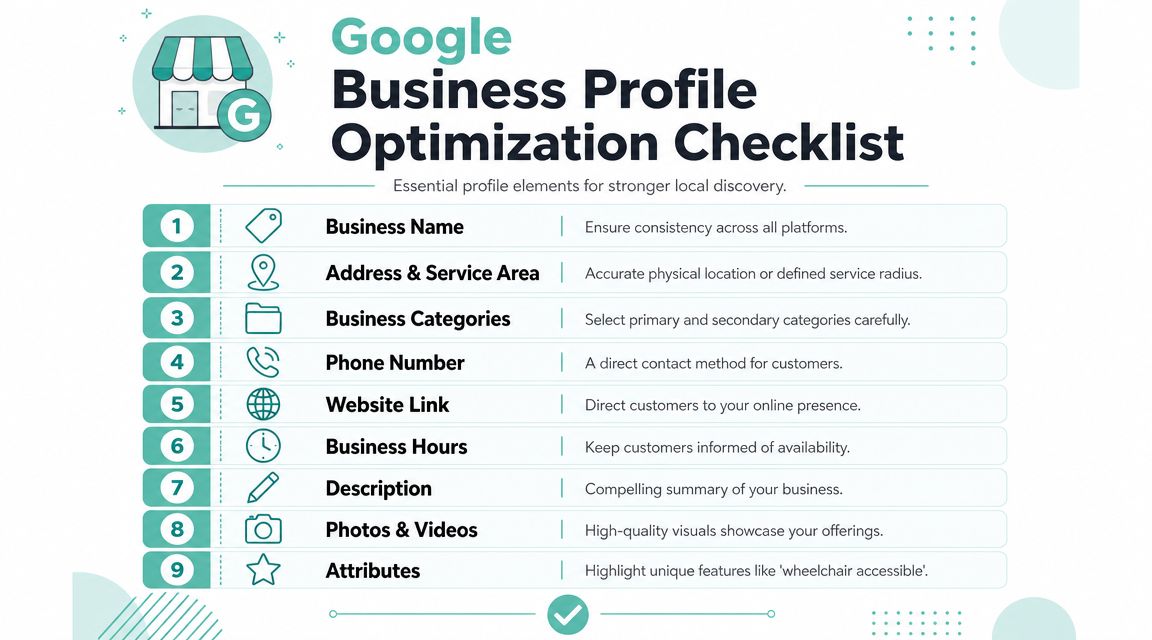
Below is a practical checklist you can work through without overcomplicating the process.
| Profile Section | Action Item | Why It Matters |
|---|---|---|
| Business Name | Keep the real trading name consistent with your website and other listings | Consistency supports trust and reduces confusion |
| Address & Service Area | Use the correct customer-facing address or define service areas accurately | Helps Google connect your business to the right local searches |
| Business Categories | Choose the best primary category, then add relevant secondary categories only | Categories influence matching for local intent |
| Phone Number | Use a direct local contact number that staff answer | Shortens the path from search to enquiry |
| Website Link | Link to the most relevant page for that location or service | Improves lead quality and supports conversion |
| Business Hours | Add standard hours and keep special hours current | Prevents lost trust from bad timing |
| Description | Write a plain-English summary of your services and locations | Gives users and Google clearer context |
| Photos & Videos | Upload real images of premises, work, team, and vehicles | Builds trust before the customer clicks or calls |
| Attributes | Select the attributes that genuinely apply to your business | Helps users decide faster |
If you're checking whether key technical files are accessible on your website, this guide on robots.txt basics is a useful reference.
What strong profiles do differently
Strong profiles usually get the basics right in a way weaker profiles don't.
- They use real photos: Frontage, reception, work in progress, staff, vehicles, menus, treatment rooms, equipment.
- They avoid keyword stuffing: The business name and description read like a business, not a spam page.
- They choose categories carefully: One clear primary category, then a handful of sensible secondary ones.
- They stay current: Hours, service availability, and contact details match real operations.
- They think locally: Service descriptions mention actual areas served in a natural way.
An Australian example helps. If you run a removalist company in Perth, your profile shouldn't just say “moving services”. It should clarify whether you handle house moves, office relocations, packing, storage coordination, or interstate work. If you're a dental clinic in Adelaide, the category and service list should separate general dentistry from cosmetic treatments or emergency appointments where appropriate.
A local profile should answer the customer's immediate question before they ask it. Are you nearby, open, credible, and right for the job?
Photos are often the most neglected part of Google local business optimisation. Generic stock shots don't help. Customers want evidence. Show the ute, the waiting room, the signage, the crew, the fitout, the dishes, the shelves, the van, the treatment space. That's what lowers hesitation.
Connecting Your UpTime Hosted Website for Maximum SEO
A Google Business Profile can generate calls on its own, but your website is where Google confirms the signals and where many buyers decide whether to trust you enough to enquire. If the profile is strong and the site is weak, your visibility can stall. If the profile is average and the site is strong, you still leave local intent underused. They need to support each other.
Your website should confirm your profile, not contradict it
The common mistake is linking a profile to a generic homepage that says almost nothing about the local service area. If your listing targets “family lawyer in Newcastle” but the website only has a broad national-style homepage with no local context, no clear contact details, and no matching service information, you create doubt.
Your website should back up the same local signals shown on the profile:
- your real business name
- the correct phone number
- the right address or service-area framing
- services that match the listing categories
- local context that makes sense for the suburbs or cities you serve
A fast, secure site also matters in practice because local visitors are often on mobile and in a hurry. Slow pages, certificate warnings, broken forms, and confusing layouts cost enquiries even when the listing itself is doing its job.
What to put on a local landing page
For most Australian small businesses, the best move is a dedicated landing page for the location or service area tied to the profile. Not a thin page with a suburb name inserted ten times. A proper page with useful local intent content.
A solid local landing page usually includes:
Clear heading and service match
Example: “Emergency Electrician in Wollongong” or “Physiotherapy Clinic in South Yarra”.Visible contact details
Put the phone number near the top, and make mobile tap-to-call obvious.Address or service area details
If customers visit you, show the address clearly. If you travel to them, explain your service area in plain language.A short local introduction
Mention the actual area you serve and the work you do there. Keep it natural.Embedded map if relevant
This helps physical-location businesses and makes directions easier.Relevant proof points
Reviews, project photos, FAQs, accreditations, or service highlights.Simple conversion path
Call, enquiry form, quote request, booking button, or appointment option.
If you need to build or rebuild that page in WordPress, this guide on creating a website with cPanel and WordPress is a practical place to start.
Simple schema structure that supports local relevance
Schema markup helps search engines understand your business data in a more structured way. For local SEO, the two useful building blocks are typically LocalBusiness and ContactPoint.
You don't need to overengineer it. What matters is that the structured data matches the visible content on the page.
Use this as a content model for your developer or site manager:
- Business name
- Business type
- Address or service area details
- Phone number
- Website URL
- Opening hours
- SameAs links where appropriate
- ContactPoint for customer enquiries
What doesn't work is stuffing schema with locations you don't serve, fake review content, or mismatched phone numbers. Structured data should clarify reality, not decorate it.
If Google sees one version of your business on the profile and another on the website, trust weakens. Local SEO gets easier when both assets tell the same story.
For multi-location businesses, each branch should usually have its own landing page with its own local details rather than one giant services page trying to cover every state and suburb at once.
Driving Engagement with Posts Reviews and Q&A
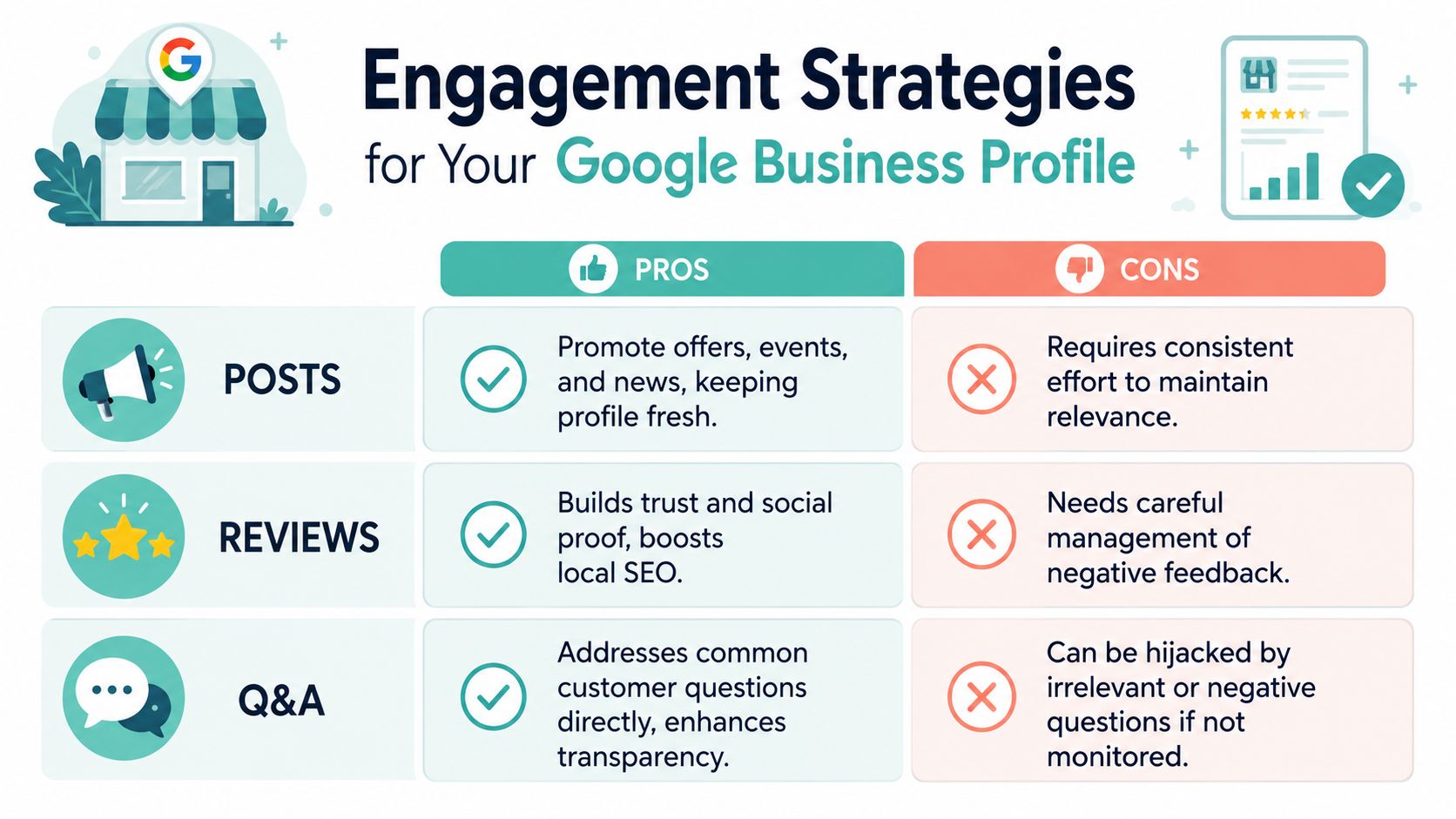
Once the profile foundation is solid, engagement features help turn a static listing into an active local sales asset. They don't replace good setup, but they sharpen trust and remove hesitation right where people are deciding whether to call.
Recent Australian data says 42% of consumers start their shopping journey with Google Search through Google's Australian consumer insight reference. That makes profile engagement more than reputation management. It's part of discovery.
Posts keep the profile active and useful
Google Posts work best when they answer a real customer question or create a timely reason to act. They're not for corporate filler.
Useful Australian examples include:
- Public holiday hours: “Open Labour Day Monday 8am to 2pm”
- Seasonal services: “Storm season roof inspection bookings now open”
- Local offer: “Free measure and quote for kitchen renovations in the Inner West”
- Event-driven update: “EOFY bookkeeping appointments available this month”
Write posts like service updates, not ad slogans. Keep them short, specific, and aligned with what the business can fulfil right now.
Reviews shape trust before the first call
Reviews do two jobs at once. They influence customer confidence, and they give Google fresh, business-specific context about your service and location.
A good review process is simple. Ask at the right moment, make the request easy, and respond to every genuine review with care. Don't dump a bulk email blast months later. Ask when the customer has just had the positive outcome.
If you want to see how detailed, real-world customer feedback helps buyers make a decision, this collection of Perth removalist reviews is a good example of the kind of specificity that builds trust.
Use response patterns like these:
- For a positive review: Thank them by name, mention the service delivered, and keep the tone human.
- For a neutral review: Acknowledge the concern, offer context if needed, and invite offline resolution.
- For a negative review: Stay calm, don't argue in public, and show that the business takes accountability seriously.
Reviews aren't just proof. They're pre-sales content written in the customer's language.
If you already manage customer communication through social channels, this guide on setting up a business Facebook page can help align your brand messaging across platforms.
Q&A removes hesitation at the bottom of the funnel
The Q&A section is underused by many local businesses, which is a missed opportunity. Customers often want quick certainty before they enquire.
Seed the section with practical questions such as:
- Do you service my suburb?
- Is parking available?
- Do I need an appointment?
- Do you handle emergency callouts?
- Do you offer same-day service?
- What payment methods do you accept?
That helps in two ways. First, it reduces repetitive admin. Second, it lets you shape expectations before a customer reaches out.
The businesses that get value from Google local business engagement don't post for the sake of activity. They use Posts, Reviews, and Q&A to answer buying questions early. That's what moves calls, bookings, and walk-ins.
Register your new domain name at competitive market prices including free domain add-ons like privacy, DNS Hosting, Custom Nameservers and Forwarding.
Always the best price and no nasty renewal price hikes.
Register A Domain Name
Managing Multiple Locations and Service Area Businesses
Single-location advice falls apart quickly once a business expands. A company with branches in Melbourne and Adelaide has different local SEO needs from a mobile locksmith covering western Sydney. The profile structure has to match the operating model.
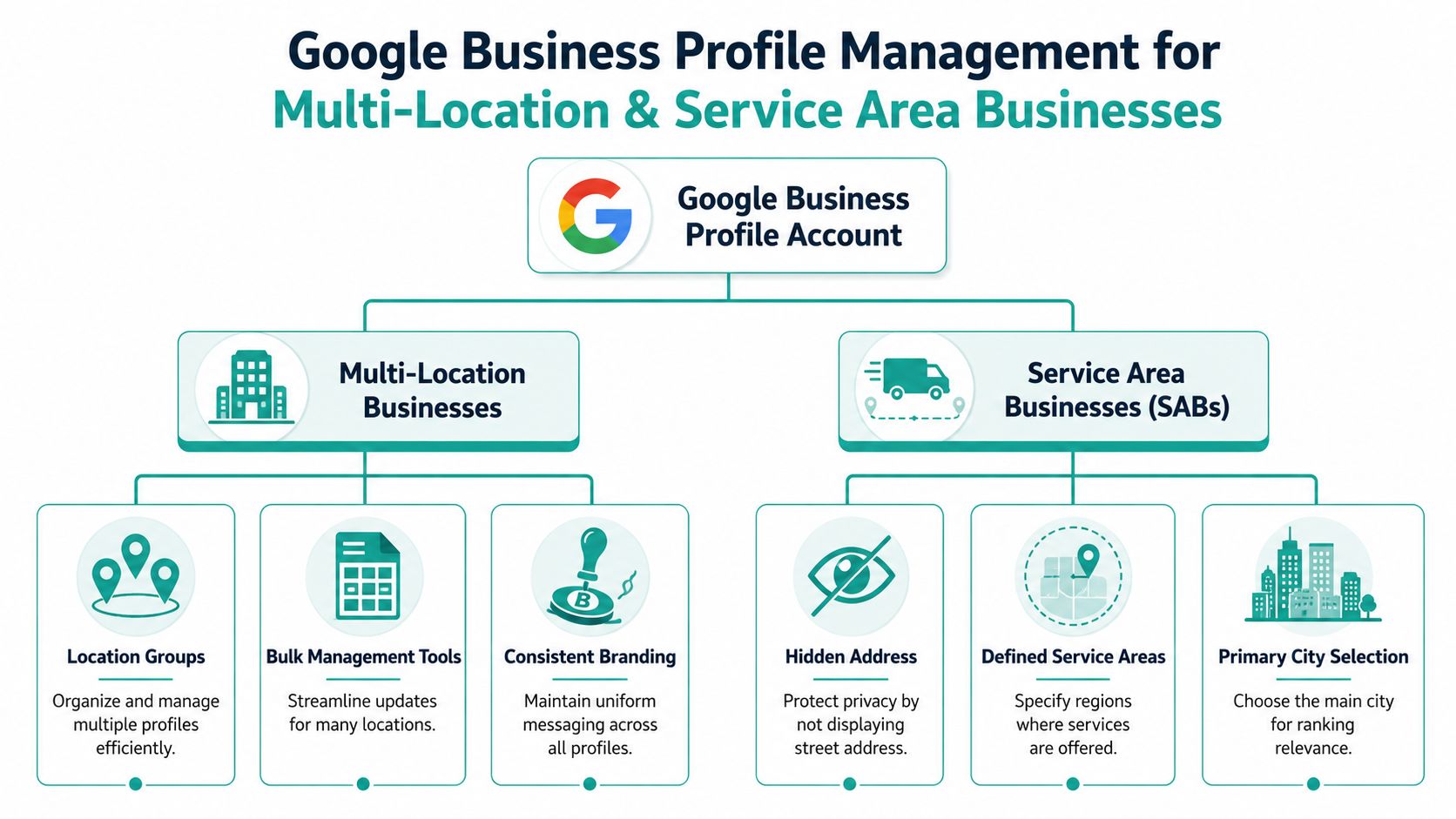
In Australia, Google holds about 94.4% of desktop search market share and 95.8% of mobile search market share, according to this Australian search market overview. That means small ranking differences between locations can materially affect lead flow.
When each location needs its own profile
A separate profile usually makes sense when each branch has its own:
- physical address
- local phone line or reception workflow
- trading hours
- staff presence
- customer-facing signage
If you run clinics in Brisbane, Gold Coast, and Toowoomba, each branch should generally stand on its own with a corresponding local landing page. This gives Google cleaner relevance signals and gives customers location-specific details without ambiguity.
For businesses planning office relocations or branch transitions, this Sydney business moving guide is a useful operational reference because address changes affect listings, customer communications, and local visibility all at once.
When a service area business setup makes more sense
A service area business setup is usually cleaner when customers don't visit your premises and the business travels to them. Think mobile detailing, pest control, cleaning, electrical callouts, or home technology installation.
In those cases, showing a private address can create confusion. It's often better to hide the address and define the service area based on the regions you serve. A broad service area on paper doesn't make the business locally relevant everywhere. Operational reality still matters.
A practical decision framework for Australian operators
Use this filter when deciding how to structure Google local business listings:
| Business situation | Better setup | Why |
|---|---|---|
| Separate customer-facing branches | One profile per branch | Each location has distinct local intent and operational details |
| One office, many surrounding suburbs served | Service area business or single storefront with careful location targeting | Avoids fake duplication |
| Mobile team with no walk-in trade | Service area business | Reflects how the business actually operates |
| Franchise or regional brand with branch managers | Separate profiles inside a managed location group | Improves control without mixing data |
A common mistake is creating multiple listings for one real location just to target extra suburbs. That usually causes duplicate issues, ranking confusion, and customer frustration. Another mistake is forcing every market into one profile when each branch clearly serves a different city.
The cleanest local structure is usually the one a customer would recognise instantly.
Tracking Performance and Troubleshooting Common Issues
Local SEO shouldn't feel like guesswork. Google gives businesses direct performance reporting in Search and Maps through the profile dashboard, and that's where you should start when assessing whether your Google local business work is producing real outcomes.

Read the metrics that connect to revenue
Not every metric matters equally. Focus first on the actions tied most closely to commercial intent.
Look closely at:
- Calls: Useful for tradies, clinics, restaurants, consultants, and any service with fast enquiry cycles.
- Website clicks: Helpful when customers need more detail before converting.
- Direction requests: Strong signal for retail, hospitality, medical, and office-based businesses.
- Search visibility trends: Useful for spotting whether updates are improving relevance over time.
A drop in views isn't always a disaster. A rise in calls and directions with steadier visibility can be a better business outcome than broad exposure with poor intent.
The right question isn't “Did my profile get seen more?” It's “Did the profile create more of the actions that lead to revenue?”
Use cleaner tracking on your website link
If you want clearer website reporting, add UTM parameters to the website link in your profile. That helps separate Google Business Profile traffic inside analytics from other traffic sources.
Keep the structure simple and consistent. If you run multiple locations, use unique UTM tagging for each branch so you can compare which profile sends stronger traffic and which landing page converts better. Pair that with call tracking or enquiry form tracking if your setup allows it.
If you're improving the destination pages those clicks land on, this guide on increasing your website ranking on Google is a useful companion resource.
Fix the problems that stall local visibility
A few issues show up repeatedly in Australian business listings.
Suspended listing
This often follows major edits, guideline issues, or mismatched business information. Start by reviewing the business name, address, category, and service setup against your real-world business. Make sure the website, signage, and business records support what the profile claims.
Incorrect user-suggested edits
Google can accept public edits to hours, categories, or other details. Check the profile regularly so bad changes don't sit live for weeks. If your holiday hours change often, update them proactively.
Duplicate listings
Duplicates split visibility, create confusion, and can send customers to the wrong phone number or address. Search your business name, old addresses, alternate phone numbers, and map pins to see whether older listings still exist. Resolve duplicates before investing more effort into review campaigns or post activity.
Wrong category or weak service alignment
If the profile gets impressions but poor-quality leads, the setup may be attracting the wrong searches. Review the primary category, secondary categories, and linked landing page.
Thin destination pages
Sometimes the listing is fine, but the website kills the enquiry. If users click through and bounce because the page is slow, vague, or inconsistent, profile performance will still feel disappointing from a business point of view.
Create a monthly review habit. Check the profile, compare it with the website, review customer actions, and note what changed. Local visibility usually improves through steady maintenance, not dramatic one-off tweaks.
If your business needs the web foundation behind a stronger Google local business presence, UpTime Web Hosting gives Australian businesses fast local hosting, .au domains, secure SSL, dependable email, and website tools that support local landing pages and clean technical SEO. If your profile is meant to drive calls and foot traffic, your website and hosting need to back it up properly.